
There are well over 50,000 storage facilities scattered throughout the country. Every one of them has a website, Facebook page, print ads, etc. But it’s that little box that people see on their screens when they type “storage units Tulsa” that they use to judge your reliability.
Your photos and unit descriptions also help them decide on your business in like 2 seconds. So, getting your Google Business Profile for storage facility services right is extremely important. In this M6 Marketing blog, we’ll explain how to pick up free, high-intent leads every month. It’s time that you stop losing renters to whoever “appears” more trustworthy in that little map pack.
Why Google Business Profile Matters So Much For Storage
Did you know that almost 7 in 10 US consumers always verify unfamiliar retailers and business services online? The internet is like a congested neighborhood filled with high-rise apartments; it’s hard to trust someone if you don’t hear a good word about them. A nice review. A friend who previously bought something from them. Put yourself in the shoes of an average person who is looking for self-storage units. How do your clients usually find you?
They typically type “storage units near me” or “storage units [city name]” on Google. They check out the map results and look at star ratings. They also tap one of the top three, check photos, or maybe read a review or two. In the end, they hit the website of the service provider that “just feels right.” Your average customer doesn’t start their journey on your fancy homepage; they start in Maps. And Google hands them the top 3 results that look relevant & trustworthy.
If your profile is half‑empty, outdated, or has weak reviews, you’re actually asking Google, “Send them somewhere else.” The good news is that this is fixable. You don’t need a huge budget. You just need to treat your profile like digital signage and front desk combined, instead of a form you filled out once in 2019. Your self-storage business needs a proper SEO strategy to make its mark. Follow these simple steps below to revamp your Google Business Profile.
Step 1: Claim The Thing (And Make Sure It’s Actually Yours)
In the world of modern marketing, values-driven brands often get the wrong end of the stick. But it’s all about changing your perspective; you should worry about optimization after you’ve gained control of your image & perception. You should search the name of your storage facility, along with the city you’re in. Do you see a box on the right (desktop) or a card with your brand’s name, address, and map pin at the top (for mobile phone users); that’s your profile!
If this portion says something like “Own this business?” or “Claim this business?” right there, it means nobody is really steering the ship. You should claim this business right away. Unless you actually own this page, you:
- Can’t fix wrong hours or a wrong phone number
- Can’t respond to reviews in your facility’s voice
- Can’t add photos, posts, or anything useful
Step 2: Get The Basics Perfect (This Is Not Optional)
Improving your Google Business Profile for storage facility services requires getting the basics right. Remember, if a stranger drove past your sign, then searched you on Google, your profile should feel exactly like the same business, not a cousin with a different nickname and phone number. That’s why you should make sure that:
- Your business name matches your signage and website
- Your address must be precise so people can come to your location easily
- Use a phone number that remains stable for years and doesn’t keep the customers hanging
- Choose the right category of business, which is “self-storage facility” in your case
Step 3: Make Hours, Access, And Location Crystal Clear
Did you know that as many as 98% of customers rely on online reviews when they are about to buy something? Imagine there is a stressed renter pulling up on your profile on their phone. Sitting in their car. Boxes everywhere. They want to know if you’re open for business, if you’ll allow them access to their stuff 24/7, and if it’s possible for them to come to your facility without an issue! Make these things clear:
- Your office hours
- Your holiday schedule
- The ease of access to your storage facility
[Image]
Step 4: Write A Description Like You’d Talk On The Phone
If you want to fill your storage units, describe them in a way you’d describe them to a person on the phone. We’re talking about the moment where you stop sounding like a listing and instead start sounding like an actual business. Just channel that friendly, small-town receptionist with a calm voice and conversational demeanor. Make sure that your unit descriptions include the 4 whys, i.e., where you are, what kind of units you offer, who you’re a good fit for, and why clients should trust you. Think beyond keywords and speak like a human being. No AI nonsense!
Step 5: Let Your Photos Do The Selling
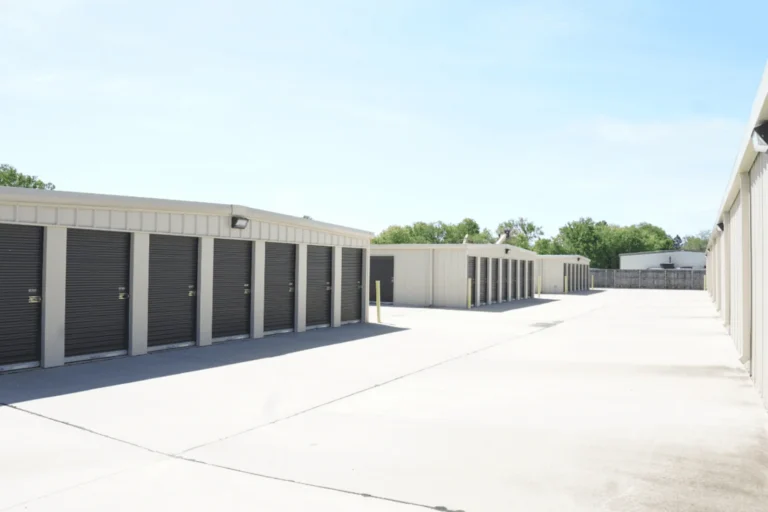
Okay, let’s be completely honest; most prospects will not read your whole description. They will glance at your photos, however. Photos are like a lobby for your self-storage businesses. Keep in mind that the lead question in their head is simple: “Does this place look clean and safe?” Is it sketchy and neglected?” The logo alone is not effective here; you should instead include:
- Clear shots of your sign and entrance
- A few angles of the drive aisles and doors
- At least one hallway or interior shot if you have climate‑controlled units
- A sample unit or two, door up, so they can judge size and cleanliness
- Any special features: covered loading, elevators, RV/boat parking, wide aisles
Step 6: Treat Reviews Like An Ongoing Conversation
If your photos give a client a short tour of your facility, you can use reviews as a reference. Keep in mind that prospects are scanning two things: your overall score (i.e., how many reviews you have) and the tone of the last few comments (plus how you responded). You can’t force people to give you good (or bad) reviews, but you can always build a culture of asking.
You should train your staff to ask after good interactions. For instance, a client told your local manager that they were really helpful. So, the manager can use this instance to ask the client to leave a nice review. Also, make it easy for clients to leave you a review by including a review link in your movie-in email. Don’t forget to put a small “Review us on Google” card at the desk. Some operators even text the link the day after move-in with a simple message.
That’s how you improve your Google Business Profile for storage facility services.
Step 7: Use Posts To Prove You’re Alive
Did you know that 64% of consumers say they want brands to connect with them? The best way to connect with your audience is to share posts online. You can share these posts in the form of a quick note about a seasonal promo, a post highlighting new climate-controlled units, holiday closure notices, or a short recap of a charity drive you hosted.
These posts are like the bulletin board on your office wall. Copied into your search listings. So, when a person clicks your profile and sees something from the last week or two, it quietly says to them, “We’re paying attention, and we’re here!” Keep each post focused on one thing and give people a simple action: call, visit the site, check availability. Don’t overthink it. That’s how you can earn the trust of your customers simply by socializing with them.
Step 8: Decide If Messaging Fits Your Operation
The best way to improve your Google Business Profile for storage facility areas is to make sure a person can message you directly. If you use this option well, this can catch renters who tend to be shy about calling. Used poorly, it becomes a black hole where leads go to die.
If you’re a one-person shop already dealing with phone calls and walk-ins, it might be smarter to nail calls and your website first. There’s no prize for having every bell and whistle turned on if you can’t keep up! Slow response on messaging feels worse to a prospect than not having it at all. If you can handle it, messaging is a great way to catch people who are sneaking a quick storage search in a meeting or on a train and don’t want to talk to a person yet.
Keep in mind that almost 9 in 10 leads want to communicate via texting; they don’t wish to call someone or talk to a person right away. So, text messaging removes this shyness barrier!
Step 9: Use “Products” To Showcase What You Actually Rent
A bitter truth and a sour pill to swallow. But most business owners don’t like to actually view the products section because it sounds like something for retailers. But storage facility owners need to make sure that their “products” are well-presented. Here’s how it goes:
- You don’t have to list every single size
- Start by thinking in categories, such as small (5×5 or 5×10), medium (10×10), large, RV & boat parking, climate-controlled units, etc.
- Don’t forget to add a quick explanation in human terms, i.e., what fits, who it’s for, etc.
- Always link each “product” back to a relevant page on your website where they can see real-time availability and pricing
Step 10: Peek At The Numbers And Tie Them Back To Move‑Ins
In the end, here’s a question for you: How do you fix something that’s invisible to Google? That is why you have to make sure that the numbers are being tracked. How many times you showed up in search? How many people clicked the Call button or visited your website? Exactly what do people type to find you (i.e., what sort of keywords are they using)? Every month, check these:
- Are calls from “Google” up, down, or flat compared to a few months ago?
- Does your team notice more “I found you on Google Maps” comments?
- Did you make changes (cleaned up hours, added new photos, pushed for reviews) before any jumps?
[Image]
Make Your Business Profile Convincing Enough
Want to revamp your Google Business Profile for storage facility services? Contact us at M6 Marketing, since we specialize in boosting your brand’s perception online. Working with us will help you understand how to fill your units and keep them occupied at all times. We have also written a detailed PDF guide on improving your storage facility’s vacancy rate, so download it today and learn everything you deserve to know about what makes your business legitimate in the eyes of the beholder. Like they say, perception is reality in business. Download now!
FAQs
Do I really need a separate profile for each location?
Yes, each facility should have its own listing with its own address, phone number, photos, and reviews. Renters care about that site, not your company in general.
How often should I update my Google Business Profile?
You should at least update it whenever hours change, you add new features, or seasons shift. Adding fresh photos and a post or two each month is a simple way to keep it looking alive.
What if we have a few bad reviews already… should we start over?
Don’t start over. Claim the profile, respond well to the reviews you have, and then build a steady stream of new, positive reviews by asking happy tenants. A pattern of recent good reviews matters more than one old bad one.
Is it worth worrying about Posts and Products if we’re busy?
Your basics (i.e., name, address, phone, hours, photos, reviews, etc.) matter most. Once those are solid, Posts and Products are “nice to have” tools to stand out and show activity, not the first priority.
How long does it take to see results from improving our profile?
You can see an uptick in calls and direction requests within a few weeks of cleaning things up, especially if your profile was neglected before. The compounding effect comes over a few months as reviews grow and more searchers choose you over the other pins on the map.
Learn how M6 handles self storage marketing for single and multi-location operators.
 Work With M6 Marketing
 M6 Services
 Related Articles